
How to build a composed trading signal with SEIOO
This tutorial walks you through a simple step by step guide on to build your first composed trading signal for any asset.
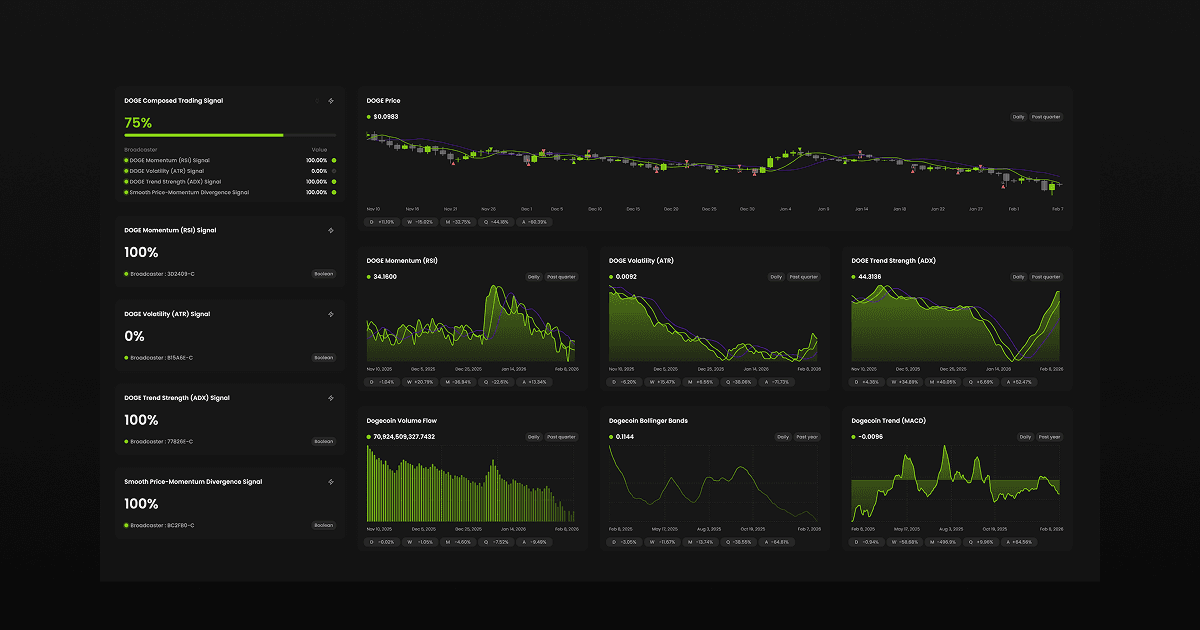
Background
The fundamental basic components behind any signal or state indicator are a set of mathematical formulas, you mostly know them by the name “indicators”, a loose name for a simple or hyper advanced mathematical formula. A mathematical formula simply calculates a new value from a single or multiple set of values.
In this tutorial we will be strictly using Formula Mode, not Chat Mode. Access the Formula Mode from the Sigma icon on the Builder drawer.
Step 1 - Price
In this tutorial our first step and primary underlying value is the price of Dogecoin, and more specifically the close price of Dogecoin.
The close price is what your normally call “the price”. A single bar, given any timeframe, has 4 price levels: open, high, low, close (OHLC). These are all different in any given single time bar, a second bar, a minute or day bar, etc.
To add the full bar price of Dogecoin to your view simply type this formula:
DOGEUSD.ohlcStep 2 - Indicators
In this tutorial we will use the most basic form of indicators, familiar to even novice retail investors:
RSI - measures momentum
ATR - measures volatility
ADX - measures trend (strength)
OBV - “smart money flow”
You can check the underlying formulas for these simple indicators using web search or any LLM, and I recommend you to do that, since these are just simple mathematical formulas, but when you advance you will build even more advanced underlying indicators and mathematical formulas.
To add these indicators to your view simply type these formulas separately:
DOGEUSD.rsiDOGEUSD.atrDOGEUSD.adxDOGEUSD.obvFormula Mode will by default build area charts, you can however control the widget type like this:
chart.area(DOGEUSD.rsi)
chart.line(DOGEUSD.rsi)
chart.bar(DOGEUSD.rsi)
chart.scatter(DOGEUSD.rsi)
Or as a card:
card(DOGEUSD.rsi)Pay attention to the fact that in this tutorial we are using very simple underlying indicators, while the capabilities of SEIOO with functions, advanced operations, logical operators, and more, enables users to build infinitely advanced underlying indicators.
Step 3 - Signals
In this tutorial, our signals are simple threshold (boolean) rules:
IF A > 50 THEN SIGNAL = ON
Signal card widgets in SEIOO are built for this simple use case. You want something to signal a binary ie ON/OFF based on any condition. In this tutorial we are writing a simple rule for a single indicator, but the capabilities are endless. You can in theory build a binary signal that is based on +100 conditions, or more.
To add a signal card to your view, you can chain it to an existing widget, by using the ID of the broadcasting widget, ie the widget that is sending the data to your signal card, or you can simply write the formula in the signal card itself. For the sake of example, we will chain the signal card to our existing indicator widget that we added earlier like this:
signal(@3D2409-C.value > 30)That formula means: create a binary ON/OFF signal based on the RSI indicator with the rule that if the RSI is above 30 the signal is ON, otherwise its OFF.
Repeat that step for all indicators you have added to your view, to build binary signals for all your indicators.
Step 4 - Composed Trade Signal
The final step in this tutorial is to build the actual trade signal. A trade signal does not execute trades per se, it signals to a separate trade engine that the trade signal is ON, it is then up to the trading engines logic to determine if a trade is viable and if so, how that trade should look like.
To add your first composed trade signal simply type this formula:
composedSignal(widget_ID, widget_ID, widget_ID, widget_ID)The widget_ID in this formula are simply the IDs of your signal card widget that you created in step 3. The composed signal function will automatically build a simple rule that if all signals are ON, the composed signal is ON. In more advanced use cases you can also set a specific threshold to the composed signal.
Example with a set threshold that simply says if 50% of the signals are ON, turn on the composed signal:
composedSignal(CA50EA-C, 04E5D7-C, DEE7E1-C, 593283-C).threshold(50)Summary
In this tutorial we:
Added the price of Dogecoin
Built 3 indicators
Built 3 signals
Built 1 composed trade signal
The composed trade signal we built informs our trading engine to act/react when a set of price indicators are turned ON.
These are the fundamental building blocks of any trading, signal, or state system, from absolute novice retail/hobby to hyper advanced quant firms. To build more advanced trade signals please read more about the SEIOO DSL syntax, to learn more about the functions and operations available (see section Guides).
To build holistic trade signals, you would incorporate more dimensions from other markets to your composed trade signal. You would monitor a macro signal, a forex signal, maybe a stock index signal, or a commodity signal, and more. This opens the doors to building extremely powerful and advanced trade signals using simple formulas and/or human language.
Was this helpful?